User Flag
Ater adding the target machine in /etc/hosts we conducted a NMAP scan.

While accessing the IP over browser we got the following URL.

After adding this URL in the /etc/hosts file we tried to access the URL.

We tried to brute force the credentials manually and the following credential set worked.
root:password

Upon enumeration we found 2 users

While checking details for user lnorgaard we found an interesting comment.

New user. Initial password set to Welcome2023!
So we have the username,password and the IP address.
Username: lnorgaard
Password: Welcome2023!
IP: 10.10.11.227
As per the nmap scan we say that ssh port is enabled.
So we have all the required information to connect the machine via ssh.
After connecting via ssh we got the user flag,

Root Flag
Here we have a RT30000.zip file. Let’s unzip it.
To copy the files from remote to local machine we are using a web server.

Looking at those files we found 2 interesting files.

KeePassDumpFull.dmp
Passcodes.kdbx
Upon googling, I found these 2 URLs useful.
https://github.com/CMEPW/keepass-dump-masterkey
https://github.com/vdohney/keepass-password-dumper

Master password: rødgrød med fløde

Using the master password we opened passcodes.kdbx in keepass application.

Below are the details for root.

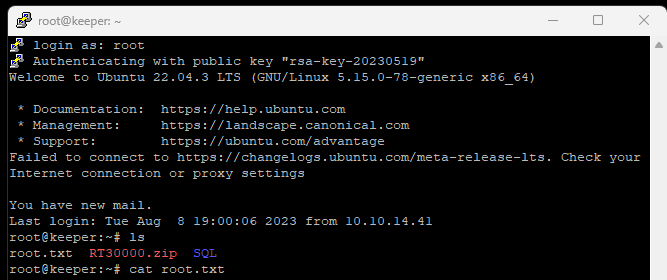
Using putty we accessed the root over ssh and got the root flag.
Security Measures
- Using secure credentials.
- Set rate limit to reduce brute force.
- Information Disclosure – Critical information like passwords should not be disclosed.
- Critical files should not be accessed by normal users unless required.
Discover more from Information Security Blogs
Subscribe to get the latest posts sent to your email.
