It is usually logos, names, etc. indicated by ™ symbol and indicated by ® symbol if registered.
Patent
It is used to protect inventions. For eg: Medicines
Trade Secrets
These are the organization’s trade secrets which helps in succeeding them. For eg: A special recipe
Import/Export Restrictions
Third Party Security
Service Level Agreement (SLA): Agreement to provide certain level of service
Right to penetration test and audit
Vendor, Consultants, Contractors, Outsourcing and Offshoring
They should at least follow organization security methods.
Acquisitions
One organization has acquired another organization
Divestiture
The organization is split up.
Security Documents
Policy
Mandatory
High level – Not specific to technology
Comprise of regulatory, advisory and informational points
Standards
Mandatory
Specific use of technology
Guidelines
Non mandatory
Usually contains recommendation on how to implement
Procedures
Mandatory
Low level
Step by step methods to implement
Baseline
Mandatory
Minimum acceptable requirement
User Security
Personnel/user security is basically securing employees. This can be achieved by:
Awareness
Training
Hiring
Background checks
Non Disclosure Agreement
Termination
Lock the account, never delete.
Access Control
Categories:
Administrative
Policies and procedures
Regulations
Training
Technical
Hardware, software and firmware
Encryption
Physical
Locks, fences, etc.
Guard, Dogs, etc.
Types:
Preventive: Least Privilege, IPS, firewall
Detective: IDS, CCTV
Corrective: Antivirus, Patching
Recovery: DR, Backup
Deterrent: Fence, Guards
Compensating
Risk Management
Risk = Threat * Vulnerability
Steps:
Identification
Asset
Tangible: Physical Hardware, Anything you can touch
Intangible: Data, trade secrets, etc.
Team
Scoping
Tools
Methods
Risk Appetite
Assessment
Quantitative
Qualitative
Cost Benefit Analysis
Mitigation/Transfer/Acceptance/Avoidance
Risk rejection is not acceptable
Total Risk = Threat * Vulnerability*Asset Value
Qualitative Risk Assessment
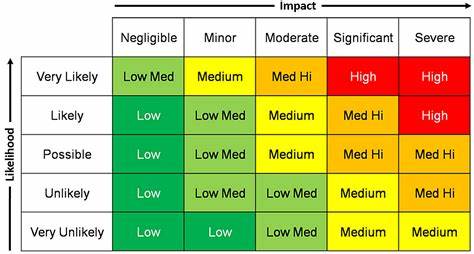
Risk Matrix
Quantitative Risk
Risk registers can be used to monitor the risk.
Risk Analysis
Single Loss Expectancy(SLE) = Asset Value(AV) * Exposure Factor(EF)
Annual Loss Expectancy(ALE) = Annual Rate of Occurrence (ARO) * Single Loss Expectancy(SLE)
Key Goal Indicators (KGI)
Defines a measure that tells management whether a goal has been achieved.
Key Performance Indicators (KPI)
Define actions that determine how well the processes are performing to reach the goal.
Key Risk Indicators (KRI)
Metrics that determine the risk organization is facing.
Risk response and mitigation
Mitigation
Transfer
Acceptance
Avoidance
Update risk registers with mitigations to get the risk to an acceptable level.
Business Continuity Planning
Comprise of:
Continuity of operations plan
Crisis communication plan
Critical infrastructure protection plan
Cyber incident response
Disaster Recovery Plan
Information system contingency plan
Occupant emergency plan
The NIST 800-34 can be followed as the standard.
Explain benefits of BCP
Cost of disaster
Regulatory requirements
Legal consequences
Loss of customer trust
Business Impact Analysis
Identify critical and non critical assets
Recovery Point Objective (RPO) – Maximum amount of data the organization can tolerate losing.
Maximum Tolerable Downtime (MTD) – Amount of time mission/business process can be disrupted without causing significant harm.
Recovery Time Objective (RTO) – Maximum length of time it should take to restore normal operations following an outage or data loss.
Work Recovery Time (WRT) – Time required to configure a recovered system.
MTD >= RTO + WRT
Mean Time Between Failures (MTBF) – How long will a new/repaired asset will function.
Mean Time To Repair (MTTR) – How long it takes to recover a failed system.
Minimum Operating Requirement (MOR) – Minimum requirement for our critical system to function.
Threat Intelligence
Set of activities that an organization undertakes to educate itself about changes in the cyber security threat landscape, and adapt security controls based upon threat information.
Mostly available on Open Source platforms.
Approaches:
Focused on Assets – Protect valuable assets
Focused on Attackers – Protect the things that attackers want to attack
Focused on Software – Protect the software
Threat Hunting
Approach to seek Indicators of Compromise (IOC) on network.
IOC can be of various types:
Unused file, processes
Log entries
Unapproved actions
STRIDE
Spoofing – Falsifying information to gain access
Tampering – Making unauthorized changes
Repudiation – Denying having done an action
Information Disclosure – Revelation of controlled information
Denial-of-Service – Prevents the use of an asset
Escalation of Privilege – Elevates capability of under privileged account
Supply Chain Risk Management (SCRM)
Vendor should perform security activities as organization follow in their environment.
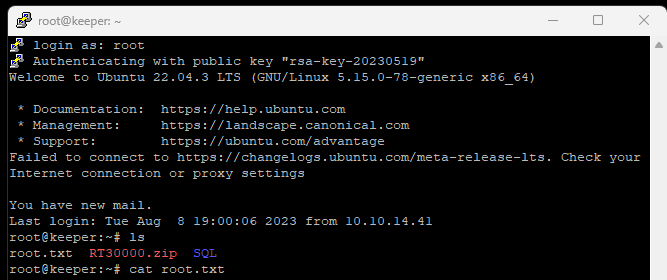
Look at the output of /etc/passwd how many “user[x]” are there on the system?
Check the number of users using cat /etc/passwd
8 users are there present.
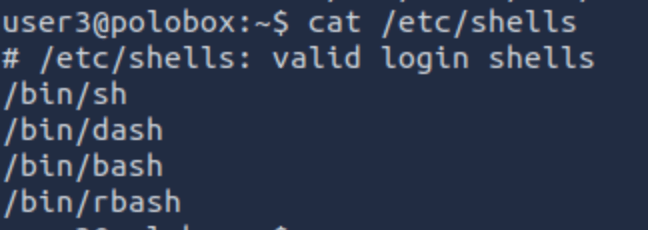
How many available shells are there on the system?
Using command: cat /etc/shells
4 shells are available.
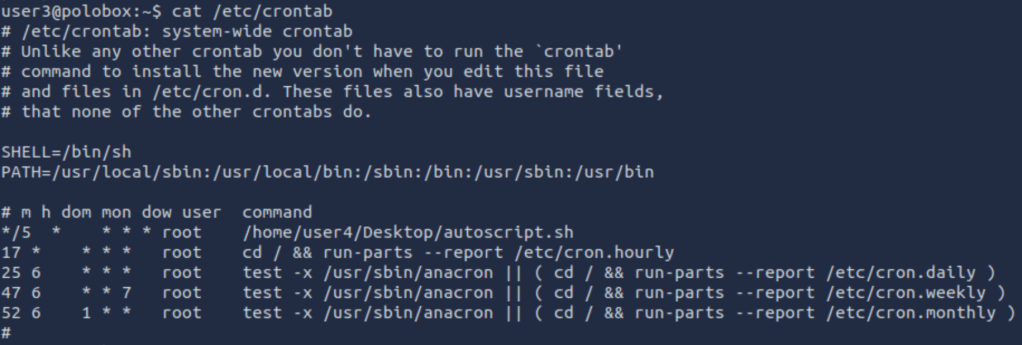
What is the name of the bash script that is set to run every 5 minutes by cron?
Using command: cat /etc/crontab
autoscript.sh
What critical file has had its permissions changed to allow some users to write to it?
passwd
After running LinEnum we found a lot of info to answer the following questions:
Method 1 – Finding and Exploiting SUID Files
The first step in Linux privilege escalation exploitation is to check for files with the SUID/GUID bit set. These are the files that can be run with the permissions of the file(s) owner/group. In this case, as the super-user.
What is a SUID binary?
In Linux, everything is a file, including directories and devices which have permissions to allow or restrict three operations i.e. read, write and execute. So when you set permission for any file, you should be aware of the Linux users to whom you allow or restrict all three permissions.
Take a look at the following demonstration of how maximum privileges (rwx-rwx-rwx) look:
r = read
w = write
x = execute
user     group     others

rwx       rwx       rwx

421       421       421
The maximum number of bits that can be used to set permission for each user is 7, which is a combination of reading (4) write (2), and execute (1) operation.
For example, if you set permissions using “chmod” as 755, then it will be rwxr-xr-x.
But when special permission is given to each user it becomes SUID or SGID. When extra bit “4” is set to the user(Owner) it becomes SUID (Set user ID) and when bit “2” is set to group it becomes SGID (Set Group ID).
Therefore, the permissions to look for when looking for SUID is:
SUID:
rws-rwx-rwx
GUID:
rwx-rws-rwx
Finding SUID Binaries
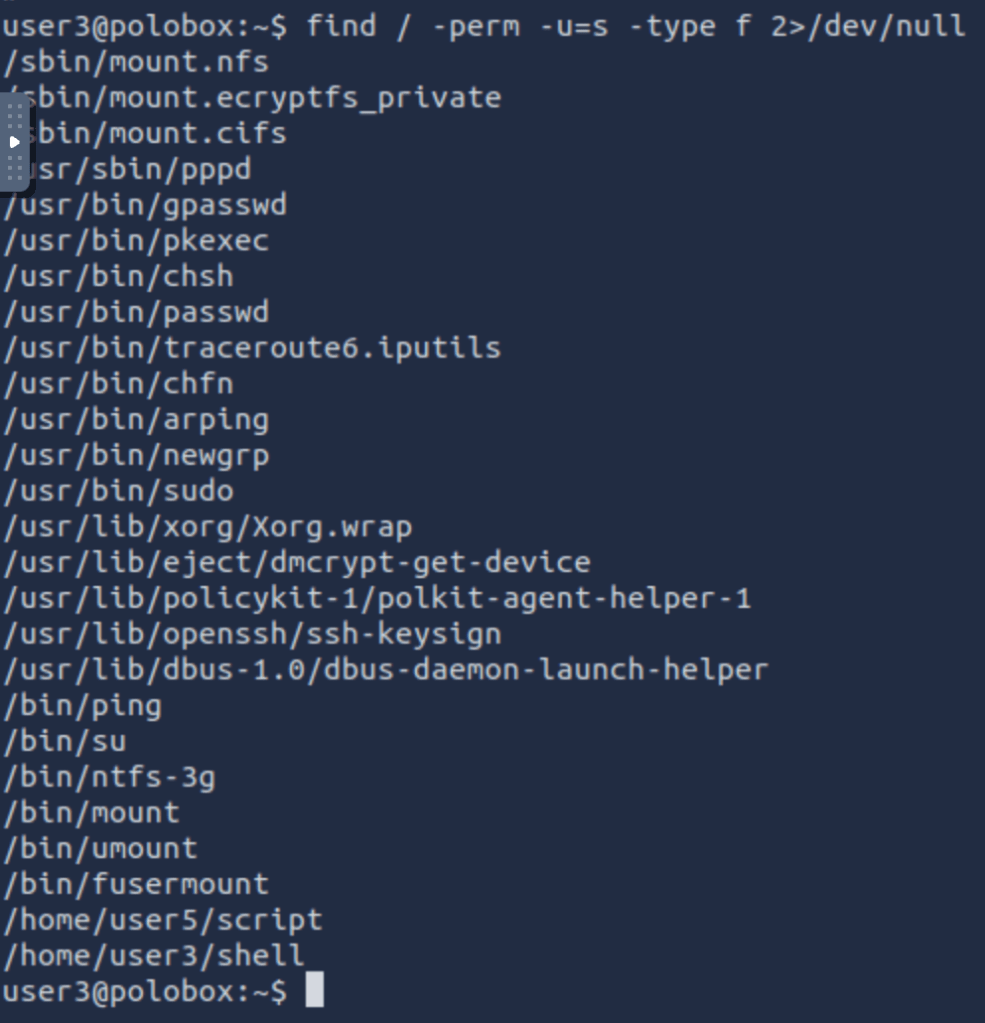
We already know that there are SUID capable files on the system, thanks to our LinEnum scan. However, if we want to do this manually we can use the command: “find / -perm -u=s -type f 2>/dev/null” to search the file system for SUID/GUID files. Let’s break down this command.
find – Initiates the “find” command
/ – Searches the whole file system
-perm – searches for files with specific permissions
-u=s – Any of the permission bits modes are set for the file. Symbolic modes are accepted in this form
-type f – Only search for files
2>/dev/null – Suppresses errors
What is the path of the file in user3’s directory that stands out to you?
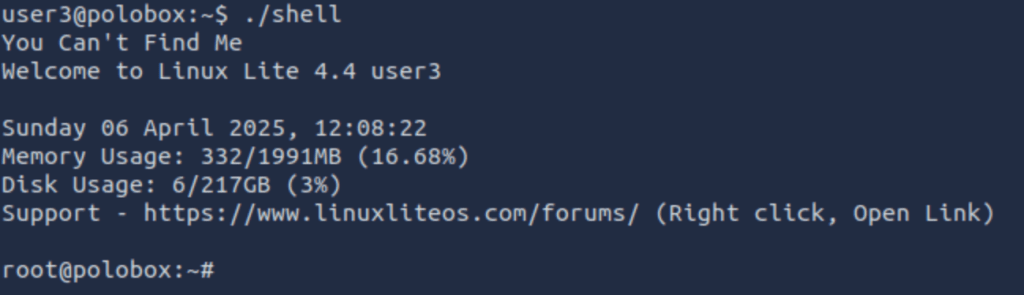
Well, “shell” is a SUID bit file, which means running it will run the script as a root user.
Method 2 – Exploiting a writable /etc/passwd
We saw that /etc/passwd for writable. So, what we will do is, create a new root user and get it listed in the /etc/passwd file.
Now logging into this user:
We are root.
Method 3 – Sudo – l
This command helps you to find commands which can be run as root without using the password.
vi can be run as sudo without password.
I opened vi as sudo using “sudo vi” command and exit the file using “:!sh”as shown below.
Upon exit it will redirect you to a shell:
Now you are root.
Method 4 – Exploiting using Crontab
The Cron daemons are processes that run commands at specific dates and times which helps us schedule activities. We can create a crontab file containing commands and instructions that will be executed by the Cron daemon.
How to view active Cronjobs.
We can use the command “cat /etc/crontab” to view what cron jobs are scheduled.
Understanding the syntax of Cronjob
Cronjobs exist in a certain format, being able to read that format is important if you want to exploit a cron job.
# = ID
m = Minute
h = Hour
dom = Day of the month
mon = Month
dow = Day of the week
user = What user the command will run as
command = What command should be run
* = All
For Example,
#
m
h
dom
mon
dow
user
command
15
*
1
*
*
*
root
cd / && run-parts –report /etc/cron.hourly
How can we exploit this?
We know from our LinEnum scan, that the file autoscript.sh, on user4’s Desktop is scheduled to run every five minutes.
It is owned by root, meaning that it will run with root privileges, despite the fact that we can write to this file. The task then is to create a command that will return a shell and paste it into this file. When the file runs again in five minutes the shell will be running as root.
What directory is the “autoscript.sh” under?
/home/user4/Desktop
Let’s change the contents of file autoscript.sh to the mentioned payload
And start the listener
Wait for a few minutes as the cronjob will execute the autoscript.sh and hopefully we will be getting a shell vis nc listener.
Finally, we got the shell.
Method 5 – Exploiting PATH variable
What is PATH?
PATH is an environmental variable in Linux and Unix-like operating systems which specifies directories that hold executable programs. When the user runs any command in the terminal, it searches for executable files with the help of the PATH Variable in response to commands executed by a user.
It is very simple to view the Path of the relevant user with help of the command “echo $PATH”.
How does this let us escalate privileges?
Let’s say we have a SUID binary. Running it, we can see that it’s calling the system shell to do a basic process like list processes with “ps”. Unlike in our previous SUID example, in this situation we can’t exploit it by supplying an argument for command injection, so what can we do to try and exploit this?
We can re-write the PATH variable to a location of our choosing! So when the SUID binary calls the system shell to run an executable, it runs one that we’ve written instead!
As with any SUID file, it will run this command with the same privileges as the owner of the SUID file! If this is root, using this method we can run whatever commands we like as root!
After seeing the above snap we observed that ./script is performing the ls command.
So we changed the value for ls as below procedure
And on executing the ./script again we got the shell.
This concludes with some basic methods to escalate privileges in Linux.
The whole CISA exam works around the concepts of risk assessment methodology. ISACA expects aspirants to have deep knowledge of terms in risk assessment.
What is risk?
A probability or threat of damage, injury, liability, loss or any other negative occurrence that is caused by external or internal vulnerabilities and that may be avoided through preventive action.
Elements of risk:
Risk is mainly comprise of probability and impact and mostly formulated using below formula:
Risk(R) = Probability(P) * Impact(I)
Both the terms are equally important while determining risk. Let us understand with an example. Probability of damage of a product is very high, let say 1, however that product hardly costs anything and hence Impact is Nil i.e. zero even if the product is damaged.
So risk of rain on articles will be: Risk = P * I i.e. Risk = 1 * 0 = 0
Vulnerability & Threat
Vulnerability means weakness and threat means something that can exploit the weakness. By using these term we have another formula for risk.
R = Vulnerability(V) * Threat(T)
For exam just remember below 2 formulae:
R = P * I
&
R = Asset Value(A) * V * T
Risk matrix
Risk matrix shows how the severity of risk is aligned with likelihood/probability and impact.
Steps for risk assessment (2 questions will be there):
Step 1: Identify Critical Assets/Processes.
Step 2: Identify relevant risks.
Step 3: Do impact analysis.
Step 4: Risk prioritization
Step 5: Risk Treatment
What is threat?
A threat is what we’re trying to protect against. Our enemy could be floods, fire, hackers, malware, criminals and many other unknown forces. Threats are not in our control.
What is vulnerability?
Vulnerability is a weakness or gap in our protection. Vulnerability can be in form of weak coding, missing anti-virus, weak access control and other related factors. Vulnerabilities can be controlled by us.
Types of Risk:
Inherent Risk: The risk that an activity would pose if no controls or other mitigating factors were in place.
Residual Risk: The risk that remains after controls are taken into account.
Detection Risk: Risk that the auditors fail to detect a material misstatement in the financial statements.
Control Risk: Risk that a misstatement could occur but may not be detected and corrected or prevented by entity’s internal control mechanism
Audit Risk: Inherent Risk x Control Risk x Detection Risk
Risk Treatment: Once risks have been identified and assessed, all techniques to manage the risk fall into one or more of these four major categories:
Risk Mitigation/Risk Reduction – In this the risk gets mitigated in a functionality.
Risk Avoidance – In this the risky functionality is dropped or removed.
Risk Acceptance – In this the risky functionality is used keeping the particular risk in mind.
Risk Transfer – In this the risk is transferred to the third party (mostly insurance) that takes care of the risk.
Audit Charter
Audit charter is a formal document that defines audit’s purpose, authority and position in an organization.
Characteristics of Audit Charter:
Most of the times an audit charter is approved by Top Management or highest level of the organization and should be approved by Audit committee too.
Audit charter is not dynamic in nature and should be changed with proper justification.
The audit function must be independent of the business function and should have direct access to the audit committee of the board.